Developers
Elissa is open source under the MIT license: github.com/inginddie/elissa. Issues and pull requests are welcome; read CONTRIBUTING.md first.
Run from source
You need uv, Node 22 and Rust.
uv sync
cd desktop && npm install && npx tauri dev   # the full app; the shell starts the Python engine with uv
uv run python -m elissa --browser            # the engine alone, with the UI in your browser
uv run pytest -q                             # tests (no network, no API keys)
Build the Windows installer into dist\:
powershell -File packaging\build.ps1 # engine (PyInstaller) + installer (Tauri/NSIS)
tests/smoke_ws.py runs a real turn against a running engine and can answer approval cards (--approve), handy for
trying a change end to end without clicking.
Architecture
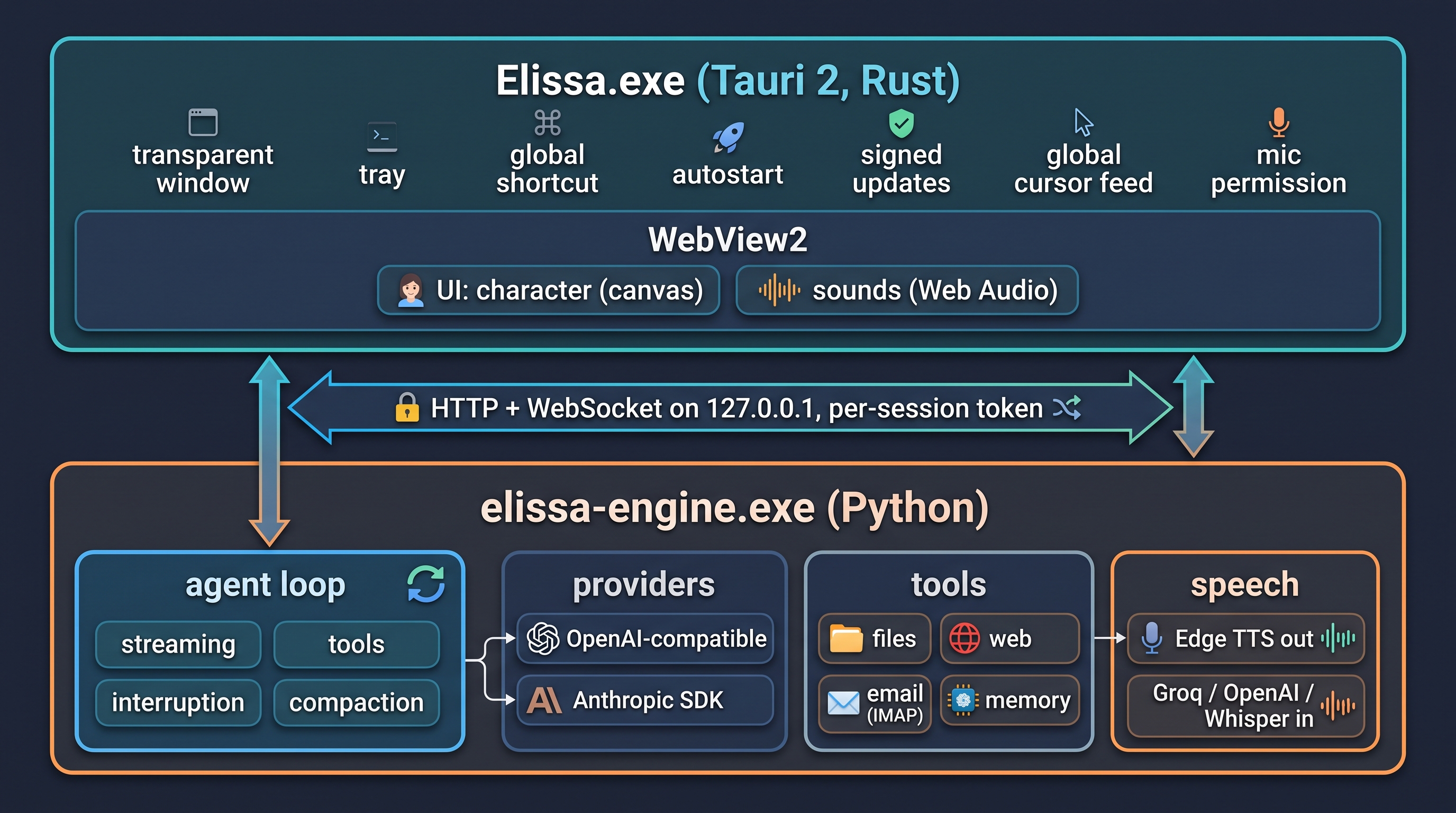
- The shell (
desktop/, Tauri 2, Rust): the transparent window, tray, global shortcut, autostart, signed updates and the engine's lifecycle. - The engine (
elissa/, Python): a local server on127.0.0.1that only Elissa's window can use, with a per-session token and an origin check. It runs the agent loop, the providers, the tools and speech. - The UI (
elissa/static/): plain HTML and JavaScript, served by the engine. Elissa herself is drawn on a canvas incharacter.js.
| Path | What lives there |
|---|---|
desktop/ |
Native shell: window modes, tray, updater, engine lifecycle |
elissa/server.py |
Local API and WebSocket, speech, setup wizard, approvals |
elissa/agent.py |
Provider-neutral agent loop and the system prompt |
elissa/llm/ |
Provider adapters; an OpenAI-compatible provider is one entry in PROVIDERS |
elissa/tools/ |
Tools; anything that changes something has a preview and goes through approval |
elissa/system/ |
What differs between Windows, macOS and Linux, and each system's capabilities |
elissa/mcp_client.py |
MCP integrations |
elissa/static/ |
UI: character.js, sounds.js, i18n.js, app.js |
docs/ |
This wiki (MkDocs Material) |
Ground rules
- Safety first. A tool that sends, writes, moves, clicks, types or runs anything must have a
previewthat shows exactly what will happen. Nothing may delete user data. Read Security before touching tools, approvals or the engine API. - Secrets only in the keychain (
elissa.config.set_secret). Never in settings, logs or the repo. - No telemetry. Network calls only to services the user configured.
- Tests for each behavior you change; everything in
tests/passes without network or keys. - UI text is written in Spanish; add the English to
elissa/static/i18n.js.
Edit this wiki
The wiki lives in docs/: English pages are page.md and Spanish pages page.es.md. Preview it with:
uv run --group docs mkdocs serve
The screenshots of Elissa's window (docs/media/screens/) come from the real app, in both languages, with a
throwaway data folder. After changing the UI, regenerate them with Microsoft Edge installed:
uv run --with playwright==1.63.0 python scripts/wiki_screenshots.py
Every push to main publishes the wiki to GitHub Pages. You can also use the button at the top
of each page.
Releases
Versions follow SemVer: patches are fixes only, minors add features, and a published tag never moves. See CONTRIBUTING.md for the steps and the changelog for what changed.